mirror of
https://github.com/obemaru4012/bamboo_websocket
synced 2026-01-09 09:01:05 +00:00
No description
|
|
||
|---|---|---|
| bamboo_websocket | ||
| example | ||
| images | ||
| tests | ||
| .gitignore | ||
| bamboo_websocket.nimble | ||
| README.md | ||
| README_ja.md | ||

🐼Bamboo-WebSocket🌿

- This is a lightweight WebSocket server implemented entirely in Nim.
- Our goal is to create a clean and elegant implementation, inspired by the simplicity of splitting bamboo.
- This project aims to simplify the creation of chat and gaming servers.
- [TODO] Detailed documentation about Bamboo and its usage will be provided in the wiki.
- The latest release is 0.3.3.
- README in Japanese.
🖥Dependency
requires "nim >= 1.4.8"
👩💻Setup
nimble install bamboowebsocket@0.3.3
🤔Description
- It is intended to be used with asynchttpserver, which is provided in the Nim standard.
🤙Usage
🐥Echo Server
- The following is a server that echoes messages received from clients.
- The following code can be found in the bamboowebsocket/example/echo_example directory.
# echo_server.nim

import asyncdispatch,
       asynchttpserver,
       asyncnet,
       httpcore,
       nativesockets,
       net,
       strutils,
       uri

from bamboo_websocket/websocket import WebSocket, ConnectionStatus, OpCode
from bamboo_websocket/bamboo_websocket import loadServerSetting, openWebSocket, receiveMessage, sendMessage

proc callBack(request: Request) {.async, gcsafe.} =
  var ws: WebSocket
  var setting = loadServerSetting()

  if request.url.path == "/":
    let headers = {"Content-type": "text/html; charset=utf-8"}
    let content = readFile("./echo_client.html")
    await request.respond(Http200, content, headers.newHttpHeaders())

  if request.url.path == "/chat":
    try:
      ws = await openWebSocket(request, setting)
    except:
      let message = getCurrentException()

    while ws.status == ConnectionStatus.OPEN:
      try:
        let receive = await ws.receiveMessage()

        if receive[0] == OpCode.TEXT:
          echo("ID: ", ws.id, " echo back.")
          await ws.sendMessage(receive[1], 0x1, 3000, true)

        if receive[0] == OpCode.CLOSE:
          echo("ID: ", ws.id, " has Closed.")
          break

      except:
        ws.status = ConnectionStatus.CLOSED
        ws.socket.close()

    ws.socket.close()

if isMainModule:
  var server = newAsyncHttpServer()
  waitFor server.serve(Port(9001), callBack)
- A json file describing the configuration file for the server must be placed in the same location as the server file (e.g. ehco_server.nim)。
{
  "websocket_version": "13",
  "upgrade": "websocket",
  "connection": "upgrade",
  "websocket_key": "dGhlIHNhbXBsZSBub25jZQ==",
  "magic_strings": "258EAFA5-E914-47DA-95CA-C5AB0DC85B11",
  "mask_key_seeder": "514902776"
}
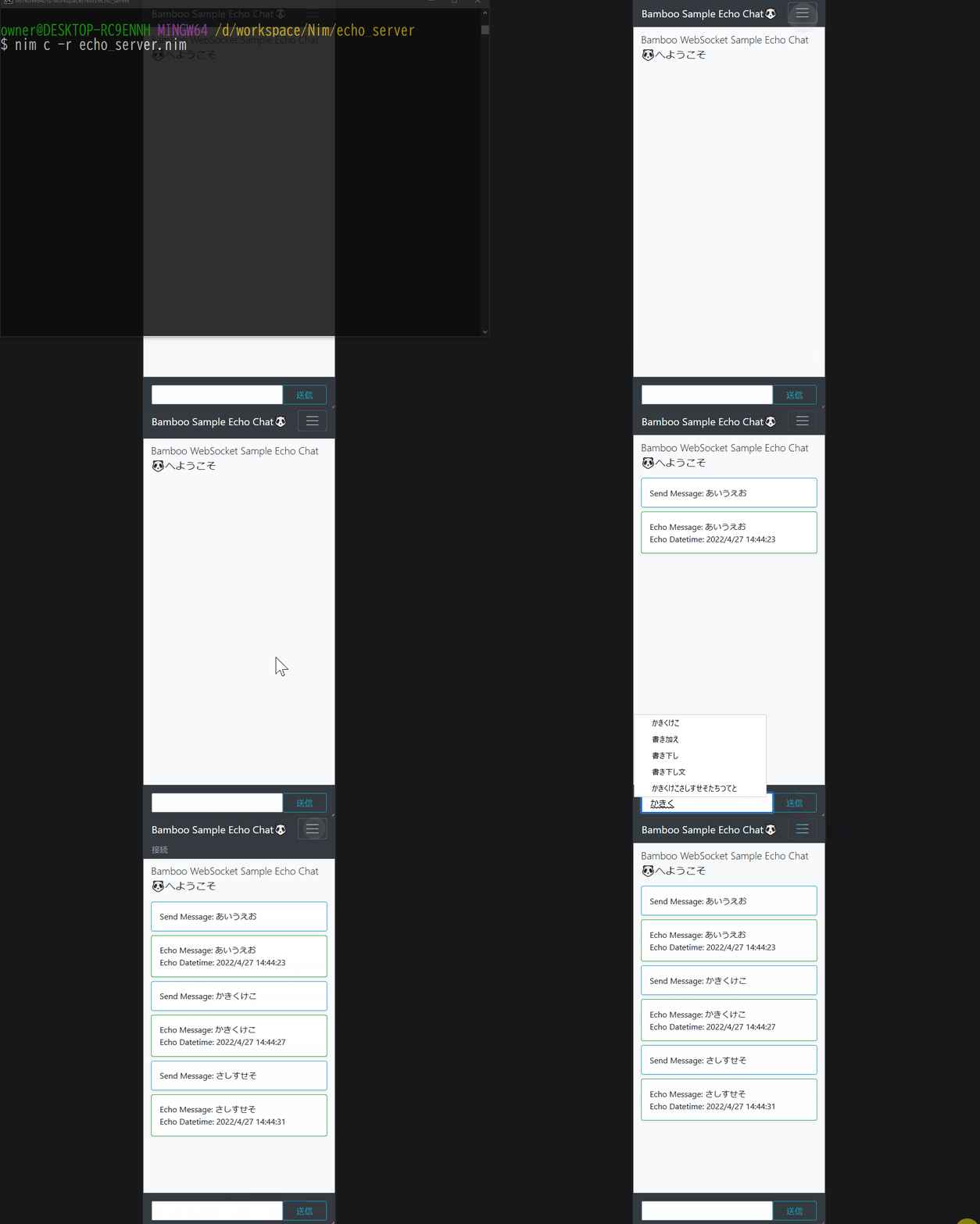
- Run echo_server.nim after compilation.
nim c -r echo_server.nim
😏Advanced Usage
🐄Chat Server
- The following code is a server that enables chatting between each client.
- The following code can be found in the bamboowebsocket/example/chat_example directory.
# chat_server.nim

import asyncdispatch,
       asynchttpserver,
       asyncnet,
       httpcore,
       json,
       nativesockets,
       net,
       strutils,
       tables,
       uri

from bamboo_websocket/websocket import WebSocket, ConnectionStatus, OpCode
from bamboo_websocket/bamboo_websocket import loadServerSetting, openWebSocket, receiveMessage, sendMessage

var WebSockets: seq[WebSocket] = newSeq[WebSocket]()

proc callBack(request: Request) {.async, gcsafe.} =

  var ws = WebSocket()
  var setting = loadServerSetting()

  if request.url.path == "/":
    let headers = {"Content-type": "text/html; charset=utf-8"}
    let content = readFile("./chat_client.html")
    await request.respond(Http200, content, headers.newHttpHeaders())

  if request.url.path == "/chat":
    try:
      ws = await openWebSocket(request, setting)

      # SubProtocol Proc(名前を取得、さらにURI decode処理を追加)
      var sub_protocol = decodeUrl(request.headers["sec-websocket-protocol", 0])
      ws.optional_data["name"] = $(sub_protocol)

      WebSockets.add(ws)
      echo("ID: ", ws.id, ", Tag: ", ws.optional_data["name"], " has Opened.")
    except:
      let message = getCurrentException()
      echo(message.msg)

      ws.status = ConnectionStatus.INITIAl

    while ws.status == ConnectionStatus.OPEN:
      try:
        let receive = await ws.receiveMessage()
        if receive[0] == OpCode.TEXT:
          var message: string = $(%* [{"name": ws.optional_data["name"], "message": receive[1]}])
          for websocket in WebSockets:
            if websocket.id != ws.id:
              echo("$# => $#" % [$(ws.id), $(websocket.id)])
              await websocket.sendMessage(message, 0x1)

        if receive[0] == OpCode.CLOSE:
          echo("ID: ", ws.id, " has Closed.")
          break

      except:
        ws.status = ConnectionStatus.CLOSED
        ws.socket.close()

    if WebSockets.find(ws) != -1:
      WebSockets.delete(WebSockets.find(ws))

    if ws.status == ConnectionStatus.OPEN:
      ws.socket.close()

if isMainModule:
  var server = newAsyncHttpServer()
  waitFor server.serve(Port(9001), callBack)
- A json file(setting.json) describing the configuration file for the server must be placed in the same location as the server file (e.g. chat_server.nim)。
{
  "websocket_version": "13",
  "upgrade": "websocket",
  "connection": "upgrade",
  "websocket_key": "dGhlIHNhbXBsZSBub25jZQ==",
  "magic_strings": "258EAFA5-E914-47DA-95CA-C5AB0DC85B11",
  "mask_key_seeder": "514902776"
}
- Run chat_server.nim after compilation.
nim c -r chat_server.nim

🐭Game Server
[TODO]